Apple’s iOS 26 introduces a transformative update, redefining the iPhone experience with a sleek design, innovative features, and a user-centric interface. This major release, packed with a liquid glass design system, enhanced animations, and powerful new functionalities, sets a new standard for mobile operating systems. In this in-depth guide, we explore the standout features of iOS 26, from revamped app icons to groundbreaking AI integrations, and explain why this update is a game-changer for iPhone users.
iOS 26 Design: The Liquid Glass Revolution
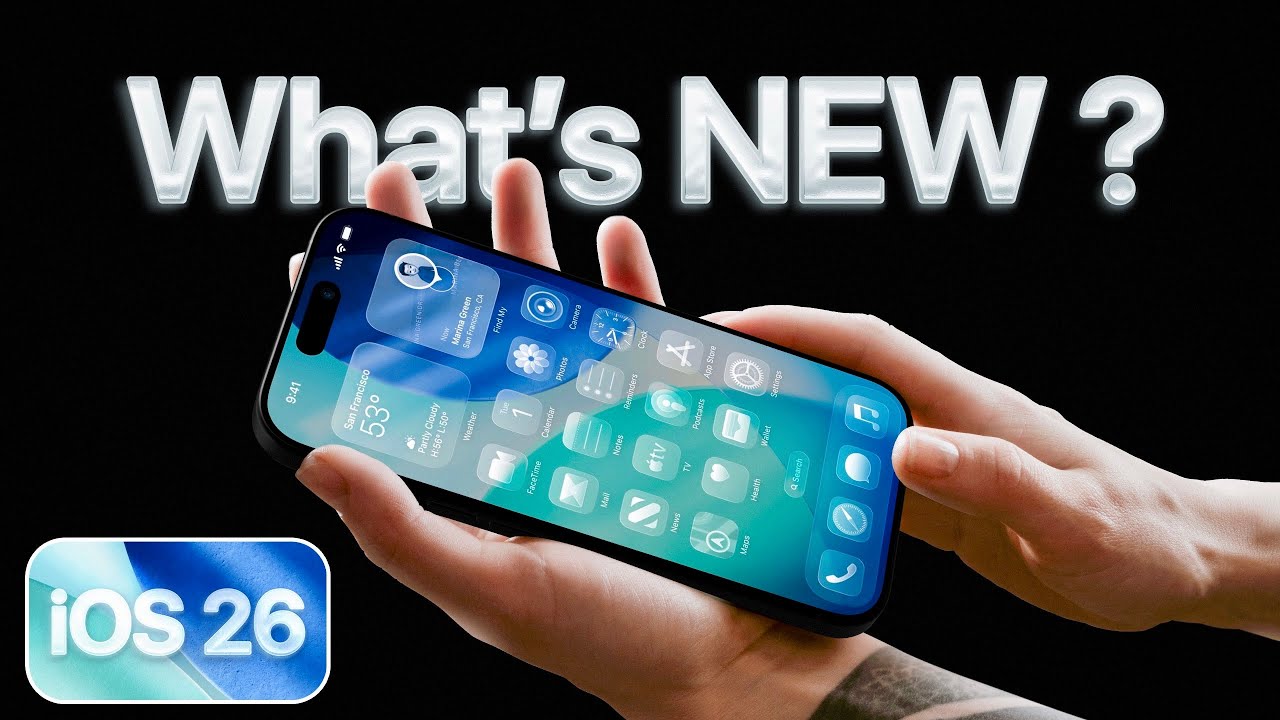
Apple’s iOS 26 embraces a liquid glass design system, a bold shift that infuses the user interface (UI) with a translucent, glass-like aesthetic. This design philosophy creates a cohesive, visually stunning experience across the iPhone’s interface, making every interaction feel fluid and modern.
Revamped App Icons with a Nostalgic Twist
The iOS 26 update reimagines app icons, blending nostalgia with modernity. Apple has redesigned its core app icons, with some receiving subtle tweaks and others undergoing dramatic transformations:
- Camera Icon: The new camera icon echoes the classic design from the original iPhone, maintaining its familiar color scheme but adopting a retro-inspired look. This nod to the past ensures instant recognizability while aligning with the liquid glass aesthetic.
- Calculator Icon: The calculator icon retains its core design but features refined styling for a polished, glassy appearance.
- Photos App Icon: The photos app icon stands out as a favorite, with a playful and vibrant design that adds a fresh, fun vibe to the home screen.
- Third-Party Apps: Even third-party apps like YouTube Studio and Google Maps adopt a unified glassy filter, ensuring a consistent look across the iPhone’s ecosystem.
Approximately 85% of the icons retain their familiar structure with minor enhancements, while the remaining 15% feature bold redesigns, creating a balanced refresh that feels both familiar and innovative.
Apple has unveiled iOS 26 Developer Beta 1, marking a significant milestone in the evolution of the iPhone’s operating system. This release introduces a bold new design language, innovative features, and a refined user experience that sets the stage for 2026. From the striking liquid glass design to advanced customization options, iOS 26 promises to transform how users interact with their iPhones. In this comprehensive guide, we explore the key updates, redesigned applications, and groundbreaking functionalities that make iOS 26 a game-changer.
iOS 26: A New Naming Convention and Supported Devices
Apple has shifted its naming strategy for iOS, moving away from version numbers to a year-based system. iOS 26, designed to power Apple devices through 2026, reflects this change. The update, available as Developer Beta 1 across iOS 26, iPadOS 26, WatchOS 26, MacOS 26, and VisionOS 26, is accessible to registered developers.
However, not all devices running iOS 18 qualify for this update. Apple has discontinued support for the iPhone XR and iPhone XS, but all other iOS 18-compatible devices can install iOS 26 Developer Beta 1. This selective compatibility ensures optimal performance on newer hardware, aligning with Apple’s commitment to innovation.
Liquid Glass Design: A Visual Overhaul
The standout feature of iOS 26 is its liquid glass design, a visually stunning aesthetic that permeates the operating system. This design introduces fluid animations, glassy icons, and a minimalist interface that enhances user engagement. Unlike iOS 18, which relied on traditional design elements, iOS 26 brings a fresh, modern look that feels both futuristic and intuitive.
Lock Screen Customization
The lock screen in iOS 26 offers unprecedented customization options. Users can now choose between glass and solid clock styles, adjust font width, and scale font size for a personalized look. New depth and light/dark mode options allow for dynamic visual effects, unavailable in iOS 18. These enhancements make the lock screen not only functional but also a canvas for self-expression.
When setting a new wallpaper, users notice a revamped user interface (UI) with animated elements like photo shuffle and weather widgets. The new iOS 26 wallpaper, paired with live animations and full-screen music playback, creates an immersive experience. For instance, playing music triggers a full-screen animation with glass-like controls, showcasing Apple’s attention to detail.
Home Screen and Icon Redesign
Every home screen icon in iOS 26 has been redesigned to align with the liquid glass aesthetic. From the Camera and Photos apps to FaceTime and Settings, each icon features a sleek, modern look. Users can now edit wallpapers directly from the home screen, adding or removing blur effects with ease. A new customization menu offers Default, Dark, Clear, and Tinted modes, with the Clear option introducing a time-based light/dark mode switch for a dynamic appearance.
The animations accompanying these changes are fluid and responsive, making transitions between screens and apps feel seamless. Widgets also adopt the liquid glass design, enhancing their visual appeal while maintaining functionality.
Enhanced Control Center
The Control Center in iOS 26 has undergone a significant transformation. While retaining its core functionality, it now features a transparent background that showcases the user’s wallpaper. Resizable icons and updated toggles offer a fresh look, with subtle animation differences that distinguish iOS 26 from its predecessor. Long-pressing on toggles like Wi-Fi or Bluetooth reveals redesigned sub-menus, adding depth to user interactions.
Apple plans to refine the Control Center in future betas, potentially adding gradients to improve visibility. For now, the transparent design creates a cohesive experience that ties into the liquid glass theme.
Camera App: A Redesigned Powerhouse
The Camera app in iOS 26 introduces a sleek UI with intuitive controls. Key options like Photo and Video are prominently displayed at the bottom, while Photos and front/rear camera toggles are easily accessible. The top-right menu offers resolution settings, flash controls, and additional options that populate dynamically at the screen’s base. This streamlined approach enhances usability, making it easier to capture stunning photos and videos.
New pop-up menus for live photos, timers, and styles add versatility, while the liquid glass design ensures a visually cohesive experience. Whether you’re a casual photographer or a content creator, the iOS 26 Camera app delivers a professional-grade interface.
Photos App: Streamlined and Intuitive
The Photos app, which faced criticism in iOS 18, has been revamped for iOS 26. A new Library option allows users to swipe between viewing modes, with a floating glass menu adding a touch of elegance. Sorting options by month, year, or all photos, combined with enhanced search capabilities, make organizing and finding images effortless. The updated UI, complete with new menus and collection options, addresses past concerns and elevates the user experience.
Messages: Smarter and More Engaging
The Messages app in iOS 26 introduces a host of new features designed to enhance communication. Users can now change message thread backgrounds, host polls for group chats, and use Apple Cash to split bills seamlessly. Typing indicators in group chats and a screen filter for spam messages improve functionality, while auto-translate supports multilingual conversations, such as translating Spanish to English in real time.
A standout feature is the Mix Emoji option, powered by Image Playground. Users can combine two emojis to create a unique, custom emoji, adding a fun and creative element to messaging. The redesigned keyboard and persistent search bar at the bottom of the screen further streamline the experience.
Settings: Subtle but Impactful Changes
The Settings app in iOS 26 retains a familiar layout but introduces subtle UI enhancements. Sub-menus for CarPlay and screen capture feature new elements, including a Visual Intelligence option for screenshots. This tool allows users to analyze screenshots, perform Google image searches, or highlight specific elements for quick searches, adding a layer of intelligence to everyday tasks.
Adaptive Power: Optimizing Battery Life
A new Adaptive Power feature optimizes battery performance by throttling background processes during high-drain activities like 4K video recording or extended FaceTime calls. Unlike the anticipated Battery Intelligence feature, which may arrive in later betas, Adaptive Power dynamically adjusts performance to extend battery life, ensuring users stay powered longer.
Safari: A Minimalist Browsing Experience
Safari in iOS 26 embraces the liquid glass design with a minimalist interface that eliminates distractions. Swiping hides menus for a full-screen experience, while tapping reveals reading options, sharing tools, and refreshed animations. The browser’s clean design and fluid transitions make browsing a pleasure, aligning with Apple’s vision of a distraction-free user experience.
Image Playground and Third-Party Integration
Image Playground in iOS 26 expands creative possibilities with animation, illustration, and sketch options. The integration of ChatGPT allows users to generate and edit images directly within the app, offering a seamless alternative to Apple Intelligence. While Google Gemini Assistant is not yet available, future betas may introduce additional third-party extensions, further enhancing Image Playground’s versatility.
Games App: A Social Gaming Hub
The new Games app in iOS 26 caters to gaming enthusiasts with a dedicated hub for discovering, playing, and sharing games. Features include a Home tab for new releases, an Arcade section for browsing categories, and a Play Together option for multiplayer gaming. With leaderboards, achievements, and a social focus, the Games app integrates seamlessly with the liquid glass design, making gaming more engaging than ever.
Previews: A Versatile Utility
The Previews app is a new addition to iOS 26, offering tools to edit images, sign PDFs, scan documents, and share files with groups. This utility streamlines document management, making it an invaluable tool for professionals and casual users alike. Its integration with the liquid glass UI ensures a consistent and visually appealing experience.
Phone App: Smarter Communication
The Phone app in iOS 26 introduces a unified layout with features like call screening to block scams, Hold Assist for managing calls on hold, and live translation for real-time multilingual conversations. The liquid glass design extends to the app’s menus and favorites, creating a cohesive and modern interface that enhances usability.
Visual Intelligence: Revolutionizing Screenshots
The Visual Intelligence feature transforms how users interact with screenshots. New options like Ask, Highlight to Search, and Image Search allow users to query screenshot content, perform Google searches, or highlight elements for instant results. This feature, integrated into the screenshot UI, leverages the liquid glass design for a seamless and intuitive experience.
iOS 26 Beta 1: A Work in Progress
As with any beta release, iOS 26 Developer Beta 1 is a work in progress. Not all announced features, such as Battery Intelligence or Google Gemini integration, are available yet. However, the current build showcases Apple’s bold vision for the future of iOS, with a focus on design, functionality, and user empowerment.
What’s Next for iOS 26?
Apple plans to refine iOS 26 through subsequent betas, addressing user feedback and optimizing performance. The official release, expected in late September 2025, will likely introduce additional features and polish the liquid glass design further. For now, developers and early adopters can explore the beta to experience the future of iPhone software.
Conclusion: A Bold Step Forward
iOS 26 Developer Beta 1 is a testament to Apple’s commitment to innovation. The liquid glass design, coupled with enhanced customization, smarter apps, and powerful new features, positions iOS 26 as one of the most significant updates since iOS 7. Whether you’re a developer or an iPhone enthusiast, iOS 26 offers a glimpse into a more dynamic, intuitive, and visually stunning future.
What are your thoughts on iOS 26? Share your feedback and join the conversation as Apple continues to shape the future of mobile technology.
Lock Screen Enhancements: Dynamic and Interactive
The iOS 26 lock screen introduces subtle yet impactful changes. The interface responds dynamically to the iPhone’s motion sensors, creating a light-refracting effect on the clock that shifts as you tilt your device. This creates a mesmerizing, almost 3D-like visual experience.
- Bouncy Animations: When unlocking the iPhone, app icons at the top of the screen exhibit a lively, springy animation, adding a playful touch to the UI.
- Customizable Clock Sizes: Users can now adjust the lock screen clock size (large, medium, or small) via a new drag-and-drop interface, offering greater personalization.
- Spatial Photos: For photos with depth data (e.g., portrait mode images), iOS 26 introduces a spatial photo feature. When activated, these photos create a 3D effect, making elements like a pet or object appear to pop off the screen as you move your iPhone.
Transparency and Layering: A Double-Edged Sword
The liquid glass design extends to transparency and layering across the UI, allowing elements to remain visible beneath active windows. For example:
- Control Center: The control center now features a transparent overlay, revealing the home screen underneath. However, this can reduce contrast, especially with vibrant apps like YouTube, which may distract from toggles like the flashlight.
- Music App: The “Now Playing” bar in the music app is semi-transparent, showing album art beneath it. While visually striking, this can feel cluttered with certain album designs.
Apple is likely to refine these transparency effects in future betas to improve accessibility and clarity, particularly for users with visual impairments.
Fluid Animations: A Playful and Responsive UI
iOS 26 elevates the iPhone experience with smoother, more playful animations that make every interaction feel alive. These enhancements are most noticeable in:
- Photos App: Tapping the “Select” button triggers a fluid animation that responds to your touch, creating a seamless and intuitive experience.
- Notes App: Buttons and boxes in the Notes app bounce and shift as you interact with them, adding a lively, tactile feel.
- Safari: The tab bar in Safari shrinks when scrolling and expands to show more details when needed, optimizing screen real estate.
These animations, while still in their beta phase, feel remarkably polished, promising an even smoother experience in the final release.
Floating Interfaces: Adapting to Modern iPhones
Apple has eliminated traditional tab bars stuck to the bottom of the screen, a design choice rooted in older iPhone models with rectangular displays. With iOS 26, the interface adapts to the rounded screens of modern iPhones:
- Floating Tab Bars: Apps like Notes, Music, and Safari now feature floating tab bars that adjust dynamically based on your actions. For example, in Safari, the tab bar minimizes during scrolling to focus on content and expands to display website details when needed.
- Contextual Options: The floating design allows bottom-screen options to change based on context, enhancing usability and reducing clutter.
This shift creates a more immersive and flexible interface, tailored to the larger, curved displays of today’s iPhones.
Redesigning Core Apps for a Modern Experience
iOS 26 overhauls several core apps, streamlining their functionality and aligning them with the liquid glass design. Here’s a closer look at the most significant updates:
Camera App: Simplified and Intuitive
The camera app, largely unchanged since the first iPhone, receives a much-needed redesign in iOS 26. The new interface is clean, intuitive, and packed with features:
- Streamlined Modes: Swipe between modes like Photo, Video, Panorama, Spatial, and Portrait, with previews that make navigation effortless.
- Advanced Options: Swipe up to access a comprehensive menu of settings, allowing quick adjustments without digging through menus.
- Format Flexibility: Users can now change photo and video formats directly from the camera app, selecting resolutions and frame rates with ease.
This redesign simplifies the user experience while accommodating the growing complexity of iPhone camera features.
Photos App: A Clutter-Free Experience
The Photos app, previously criticized for its convoluted design in iOS 18, is completely reimagined in iOS 26:
- Library and Collections: The app now features two clear sections—Library for all photos and Collections for albums and curated sets. Switching between them is a single tap away.
- Improved Search: The search button, previously a small, hard-to-reach icon, is now larger and thumb-friendly, enhancing one-handed usability.
These changes make the Photos app more intuitive and user-friendly, addressing long-standing pain points.
FaceTime: A Fresh, Engaging Interface
The FaceTime app ditches its outdated list-based design for a vibrant, modern interface:
- Recent Calls: The app opens to a dynamic list of recent calls, with video messages auto-playing in their respective cards for a more engaging experience.
- New Call Button: A prominent button at the bottom simplifies starting new FaceTime calls.
This redesign makes FaceTime more visually appealing and functional, aligning it with modern communication needs.
Phone App: Subtle Updates with Powerful Features
While the Phone app’s redesign is less extensive than anticipated from Apple’s keynote, it introduces key improvements:
- Redesigned Layout: The app features updated tabs for Recent Calls, Contacts, Keypad, and Search, with smooth, glass-effect animations during transitions.
- Call Screening: iOS 26 introduces AI-powered call screening for unknown numbers. A Siri-like voice answers, collects the caller’s name, and only then rings your phone, reducing spam interruptions.
- On-Hold Assist: When placed on hold, the iPhone detects hold music and displays a button to let the device wait for you. AI alerts you when an agent picks up, eliminating the need to endure hold music.
These features, inspired by competitors like Google Pixel, bring significant convenience to iPhone users.
Messages: Enhanced Communication Tools
The Messages app in iOS 26 gains several exciting features, making conversations more dynamic and organized:
- Custom Backgrounds: Users can now add backgrounds to iMessage conversations, similar to WhatsApp. While visually appealing, this feature may feel cluttered with multiple message bubbles.
- Group Chat Polls: A new poll feature allows group chat participants to vote on options, streamlining decision-making in large groups.
- Typing Indicators in Group Chats: For the first time, group chats display typing indicators, letting you know who is responding in real-time.
- Spam Filtering: Texts from unknown numbers are automatically routed to a spam folder, keeping your inbox clean and distraction-free.
These updates make Messages more versatile and user-friendly, catering to both personal and group communication.
Visual Intelligence: AI-Powered Screen Analysis
iOS 26 introduces a groundbreaking visual intelligence feature that analyzes content directly on your iPhone’s display:
- Screenshot Analysis: When you take a screenshot, iOS 26 offers options to use AI (powered by ChatGPT) to analyze the content, copy links, or perform image searches. For example, spotting a pair of shoes on a website allows you to search for them instantly.
- Calendar Integration: If a screenshot contains a date, iOS 26 can automatically add it to your calendar with a single tap.
This feature transforms how users interact with on-screen content, making the iPhone smarter and more proactive.
Full-Screen Music Playback on the Lock Screen
Music playback on the lock screen gets a vibrant upgrade in iOS 26:
- Full-Screen Album Art: Tap the album art to expand it to full screen, showcasing animated album visuals for a more immersive experience.
- Dynamic Controls: The default lock screen view remains compact, but the full-screen option adds a bold, visually engaging layer to music playback.
This feature enhances the iPhone’s role as a multimedia powerhouse, making music playback more engaging.
Performance and Beta Considerations
As the first beta of iOS 26, the update already feels remarkably smooth, with fluid animations and responsive interactions. However, some areas, such as transparency contrast and accessibility, require refinement. Apple is expected to address these issues in subsequent betas, ensuring a polished final release.
Why iOS 26 Stands Out
iOS 26 is more than just an incremental update—it’s a bold reimagining of the iPhone experience. The liquid glass design, coupled with dynamic animations and powerful new features like call screening, on-hold assist, and visual intelligence, positions iOS 26 as a leader in mobile innovation. Whether you’re a long-time iPhone user or new to the ecosystem, this update delivers a fresh, intuitive, and visually stunning experience.
How to Get Started with iOS 26
To experience iOS 26, download the beta through Apple’s developer or public beta program. Be aware that betas may contain bugs, so back up your device before installing. For the latest updates and tutorials, subscribe to tech channels or follow Apple’s official announcements.
Conclusion: A New Era for iPhone
iOS 26 marks a pivotal moment for Apple, blending cutting-edge design with practical features that enhance everyday use. From the liquid glass UI to AI-driven functionalities, this update redefines what an iPhone can do. Share your thoughts on iOS 26 in the comments below, and stay tuned for more updates as Apple refines this revolutionary release.